Building a server module
In this tutorial we’ll show you how to build a Group Office module. As an example we’re going to build a Music module.
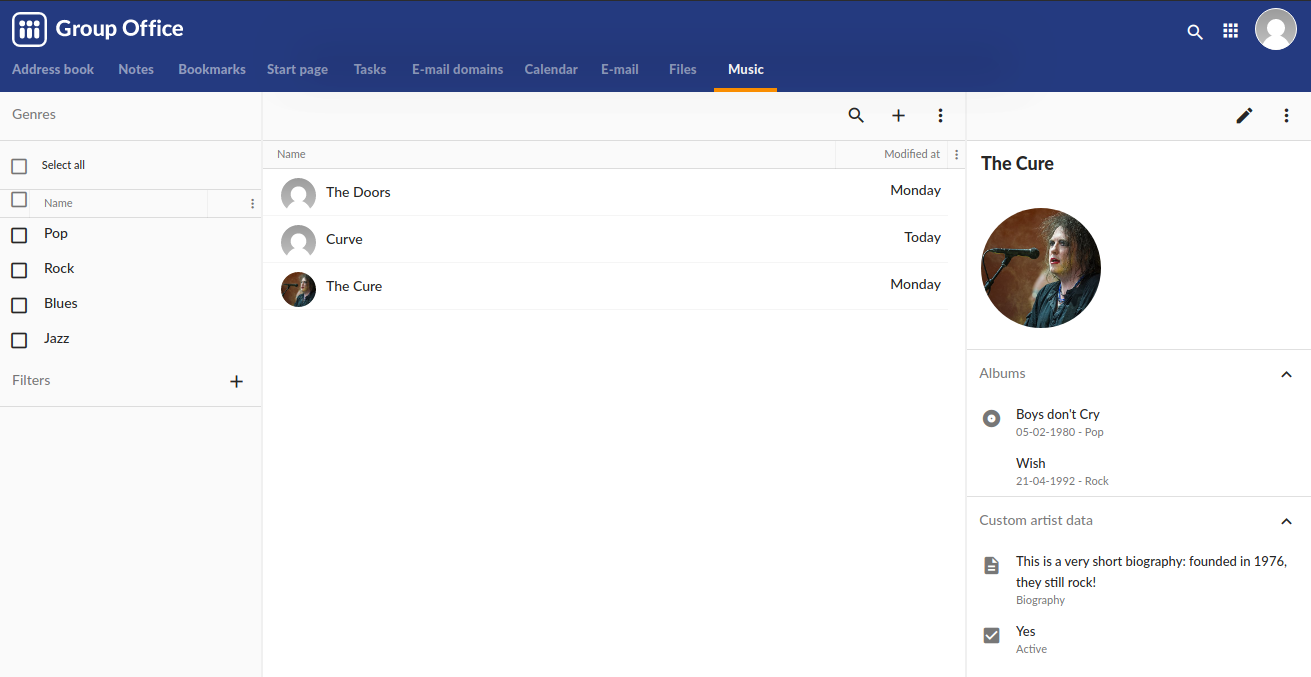
Group Office is a JMAP-based server API and a webclient. We’ll start with implementing the JMAP server API.
Development environment
If you haven’t got your development environment set up, then please do this first.
You can install GroupOffice like described in this manual and get started or use our Docker compose project that installs our images for development:
Required software
To follow this tutorial you need the following software installed:
Code standards
When writing code we following standards:
Use tabs to indent code
Use braces with all structures
Don’t use ?> close tag at the end of class files
One class per file
YAGNI
DRY
Naming conventions
Properties |
lowerCamelCase |
Methods |
lowerCamelCase |
Constants |
UPPER_UNDERSCORED |
Database tables |
lower_underscored (For windows compatibility),
names consist of package, module and object name,
and singular e.g.
|
Database fields |
lowerCamelCase |
Namespaces |
lower_underscored |
Note
We’re currently refactoring the whole code base. So you will encounter the namespaces “go” and “GO”. The “GO” namespace with capitals is old and you should not use it in new code. Legacy modules are found in “modules” folder and new modules are in “go/modules/<package>/<name>”.
Server module
The code for the module can be found at https://github.com/Intermesh/groupoffice-tutorial
The server modules are created in the following path:
"go/modules/<PACKAGE>/<MODULE>"
The package is a group of modules that belong to each other. It is used to group modules per type or per customer.
So our music module will be created in:
"go/modules/tutorial/music"
Database
Start with creating the database tables. The tables would be prefixed with the
package and module names. For example tutorial_music_artist.
Create the tables by importing this SQL into your database:
--
-- Table structure for table `tutorial_music_artist`
--

CREATE TABLE IF NOT EXISTS `tutorial_music_artist`
(
    `id`         int(11) UNSIGNED NOT NULL AUTO_INCREMENT,
    `name`       varchar(190)     NOT NULL,
    `photo`      binary(40)                DEFAULT NULL,
    `createdAt`  datetime         NOT NULL,
    `modifiedAt` datetime         NOT NULL,
    `createdBy`  int(11)          NOT NULL,
    `modifiedBy` int(11)          NOT NULL,
    `active`     tinyint(1)       NOT NULL DEFAULT 1,
    `bio`        text                      DEFAULT NULL,
    PRIMARY KEY (`id`),
    KEY `photo` (`photo`)
) ENGINE = InnoDB
  DEFAULT CHARSET = utf8mb4
  COLLATE = utf8mb4_unicode_ci;


--
-- Table structure for table `music_album`
--

CREATE TABLE IF NOT EXISTS `tutorial_music_album`
(
    `id`          int(11) UNSIGNED NOT NULL AUTO_INCREMENT,
    `artistId`    int(11) UNSIGNED NOT NULL,
    `name`        varchar(190)     NOT NULL,
    `releaseDate` date             NOT NULL,
    `genreId`     int(11) UNSIGNED NOT NULL,
    PRIMARY KEY (`id`),
    KEY `artistId` (`artistId`),
    KEY `genreId` (`genreId`)
) ENGINE = InnoDB
  DEFAULT CHARSET = utf8mb4
  COLLATE = utf8mb4_unicode_ci;

-- --------------------------------------------------------

--
-- Table structure for table `music_artist_custom_fields`
--

CREATE TABLE IF NOT EXISTS `tutorial_music_artist_custom_fields`
(
    `id` int(11) UNSIGNED NOT NULL,
    PRIMARY KEY (`id`)
) ENGINE = InnoDB
  DEFAULT CHARSET = utf8mb4
  COLLATE = utf8mb4_unicode_ci;

-- --------------------------------------------------------

--
-- Table structure for table `music_genre`
--

CREATE TABLE IF NOT EXISTS `tutorial_music_genre`
(
    `id`   int(11) UNSIGNED NOT NULL AUTO_INCREMENT,
    `name` varchar(190)     NOT NULL,
    PRIMARY KEY (`id`)
) ENGINE = InnoDB
  DEFAULT CHARSET = utf8mb4
  COLLATE = utf8mb4_unicode_ci;

-- --------------------------------------------------------

--
-- Table structure for table `music_review`
--

CREATE TABLE IF NOT EXISTS `tutorial_music_review`
(
    `id`         int(11) UNSIGNED     NOT NULL AUTO_INCREMENT,
    `albumId`    int(11) UNSIGNED     NOT NULL,
    `aclId`      int(11)              NOT NULL,
    `createdBy`  int(11)              NOT NULL,
    `modifiedBy` int(11)              NOT NULL,
    `rating`     smallint(5) UNSIGNED NOT NULL,
    `title`      varchar(190)         NOT NULL,
    `body`       text                 NOT NULL,
    PRIMARY KEY (`id`),
    KEY `aclId` (`aclId`),
    KEY `albumId` (`albumId`)
) ENGINE = InnoDB
  DEFAULT CHARSET = utf8mb4
  COLLATE = utf8mb4_unicode_ci;

--
-- Constraints for table `music_review`
--
ALTER TABLE `tutorial_music_review`
    ADD CONSTRAINT `music_review_fk1` FOREIGN KEY (`albumId`) REFERENCES `tutorial_music_album` (`id`) ON DELETE CASCADE,
    ADD CONSTRAINT `music_review_fk2` FOREIGN KEY (`aclId`) REFERENCES `core_acl` (`id`);


ALTER TABLE `tutorial_music_album`
    ADD CONSTRAINT `music_album_ibfk_1` FOREIGN KEY (`artistId`) REFERENCES `tutorial_music_artist` (`id`) ON DELETE CASCADE,
    ADD CONSTRAINT `music_album_ibfk_2` FOREIGN KEY (`genreId`) REFERENCES `tutorial_music_genre` (`id`);

ALTER TABLE `tutorial_music_artist`
    ADD CONSTRAINT `tutorial_music_artist_ibfk_1` FOREIGN KEY (`photo`) REFERENCES `core_blob` (`id`);

--
-- Constraints for table `music_artist_custom_fields`
--
ALTER TABLE `tutorial_music_artist_custom_fields`
    ADD CONSTRAINT `music_artist_cf_ibfk_1` FOREIGN KEY (`id`) REFERENCES `tutorial_music_artist` (`id`) ON DELETE CASCADE;


INSERT INTO `tutorial_music_genre` (`id`, `name`)
VALUES (1, 'Pop'),
       (2, 'Rock'),
       (3, 'Blues'),
       (4, 'Jazz'),
       (5, 'Metal'),
       (7, 'Industrial');
Database rules
Also see naming conventions.
Date fields use column type “DATE”.
Date and time columns use type “DATETIME”.
Foreign key’s must be defined for relationships. Think about cascading delete set to null or restrict. In general. Properties should always be cascaded and entities should be restricted. They should be cascaded by overriding the internalSave() function so all the application logic will be executed like cleaning up links, logging etc.
We often choose a varchar to be 190 characters so it can be indexed on all database versions.
Columns modifiedBy (int), createdBy (int), createdAt (DATETIME), modifiedAt (DATETIME) are automatically set by Group Office.
Property and Entity models
It is up to you as the developer to determine which database tables should be treated as entities and which as properties. You can read more about entities and properties here, but a general rule of thumb is that entities can exist independently. An entity can be modified by the API directly and a property is only modifiable through an entity. For example an email address of a contact is a property of the entity contact.
So the first step is to change some properties into JMAP entities. In this example Artist and Genre are entities.
So the model/Artist.php model class should be defined as an entity:
use go\core\jmap\Entity;

class Artist extends Entity {
If you were to define a Property instead, like for instance an album, you would do it like this:
use go\core\orm\Property;

class Artist extends Property {
Controllers
In the old days, controller classes were separated automatically based on the defined entity models. However, this tool has been replaced by something completely different. Instead, we write our own controller class like so:
namespace go\modules\tutorial\music\controller;

use Exception;
use go\core\jmap\EntityController;
use go\core\jmap\exception\InvalidArguments;
use go\core\util\ArrayObject;
use go\core\jmap\exception\StateMismatch;
use go\modules\tutorial\music\model;

class Artist extends EntityController
{

    protected function entityClass(): string
    {
            return model\Artist::class;
    }

    public function query(array $params): ArrayObject
    {
            return $this->defaultQuery($params);
    }

    public function get(array $params): ArrayObject
    {
            return $this->defaultGet($params);
    }

    public function set(array $params): ArrayObject
    {
            return $this->defaultSet($params);
    }

    public function changes(array $params): ArrayObject
    {
            return $this->defaultChanges($params);
    }
}
Do the same for the Genre and Review controllers.
Relations
Now we must define relations in the models. Add the “albums” relation to the artist by creating a new public property:
/**
 * The albums created by the artist
 *
 * @var array
 */
 public $albums;
And then change the mapping:
protected static function defineMapping(): Mapping {
    return parent::defineMapping()
            ->addTable("tutorial_music_artist", "artist")
            ->addArray('albums', Album::class, ['id' => 'artistId']);
}
Note
When making changes to the database, model properties or mappings, you
must run http://localhost/install/upgrade.php in your browser to rebuild the cache.
Custom properties
For the sake of learning, we will add a property to our model, that does not directly stem from its own table. In this example, we want to display the number of albums for a certain artist in the artist grid.
The first step is to declare the property in the model and to implement a getter:
/** @var int */
protected $albumCount;

// (...)

public function getAlbumCount() :int
{
  return $this->albumCount;
}
The next step is to update the defineMapping method, to actually count the albums:
protected static function defineMapping(): Mapping
{
        return parent::defineMapping()
                ->addTable("tutorial_music_artist", "artist")
                ->addMap('albums', Album::class, ['id' => 'artistId']);
    ->addQuery((new Query())->select('COUNT(alb.id) AS albumCount')
        ->join('tutorial_music_album', 'alb','artist.id=alb.artistId')->groupBy(['alb.artistId']) );
}
The albumCount property is simply retrieved by counting the albums that are related to the current artist.
Note
Please note that in this example, we do not define a setter method. It should not be possible to manually set an album counter, since it is a counter of related properties.
There is actually a better way of getting an album count. In order to keep things simple, one can remove the extra query
and redefine the getAlbumCount() function as follows:
public function getAlbumCount() :int
{
  return count($this->albums);
}
Translations
To define a nice name for the module create language/en.php:
<?php
return [
                'name' => 'Music',
                'description' => 'Simple module for the GroupOffice tutorial'
];
If you’re interested you can read more about translating here.
Install the module
Now we’ve got our basic server API in place. Now it’s time to install the module at:
System Settings -> Modules. There should be a Tutorial package with the “music” module.
Check the box to install it.
Note
If it doesn’t show up it might be due to cache. Run /install/upgrade.php to clear it.
Connecting to the API with POSTMan
Using the API with Postman is not strictly necessary but it’s nice to get a feel on how the backend API works.
Install Postman or another tool to make API requests. Download it from here:
Authenticate
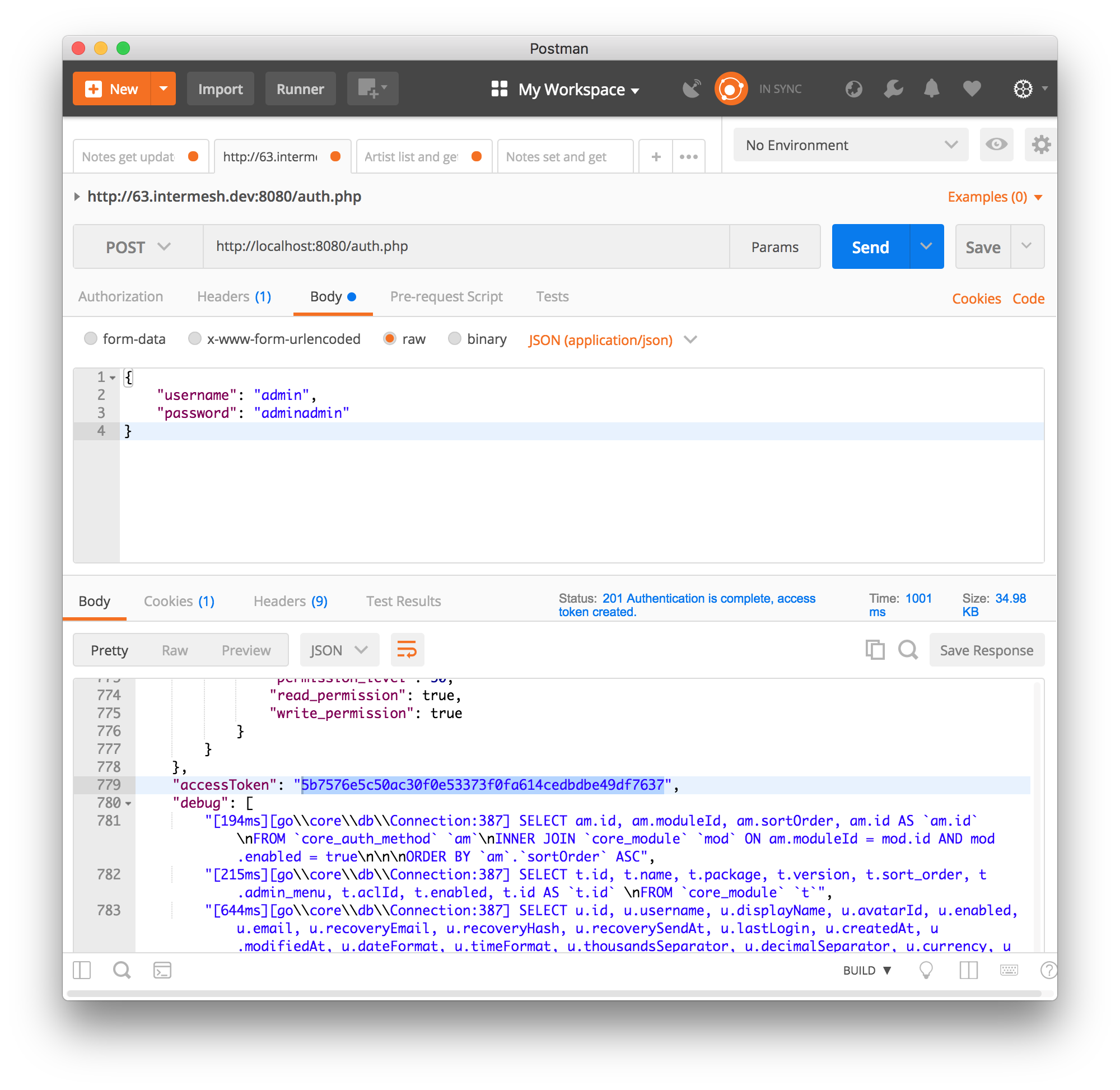
Send a POST request to:
http://localhost/api/auth.php
use content type:
application/json
And the following request body:
{
   "username": "admin",
   "password": "adminadmin"
}
When successfully logged on you should get a response with status:
201 Authentication is complete, access token created
Find the “accessToken” property and save it. From now on you can do API requests to:
http://localhost/api/jmap.php
You must set the access token as a header on each request:
Auhorization: Bearer 5b7576e5c50ac30f0e53373f0fa614cedbdbe49df7637
Content-Type: application/json
Create an artist
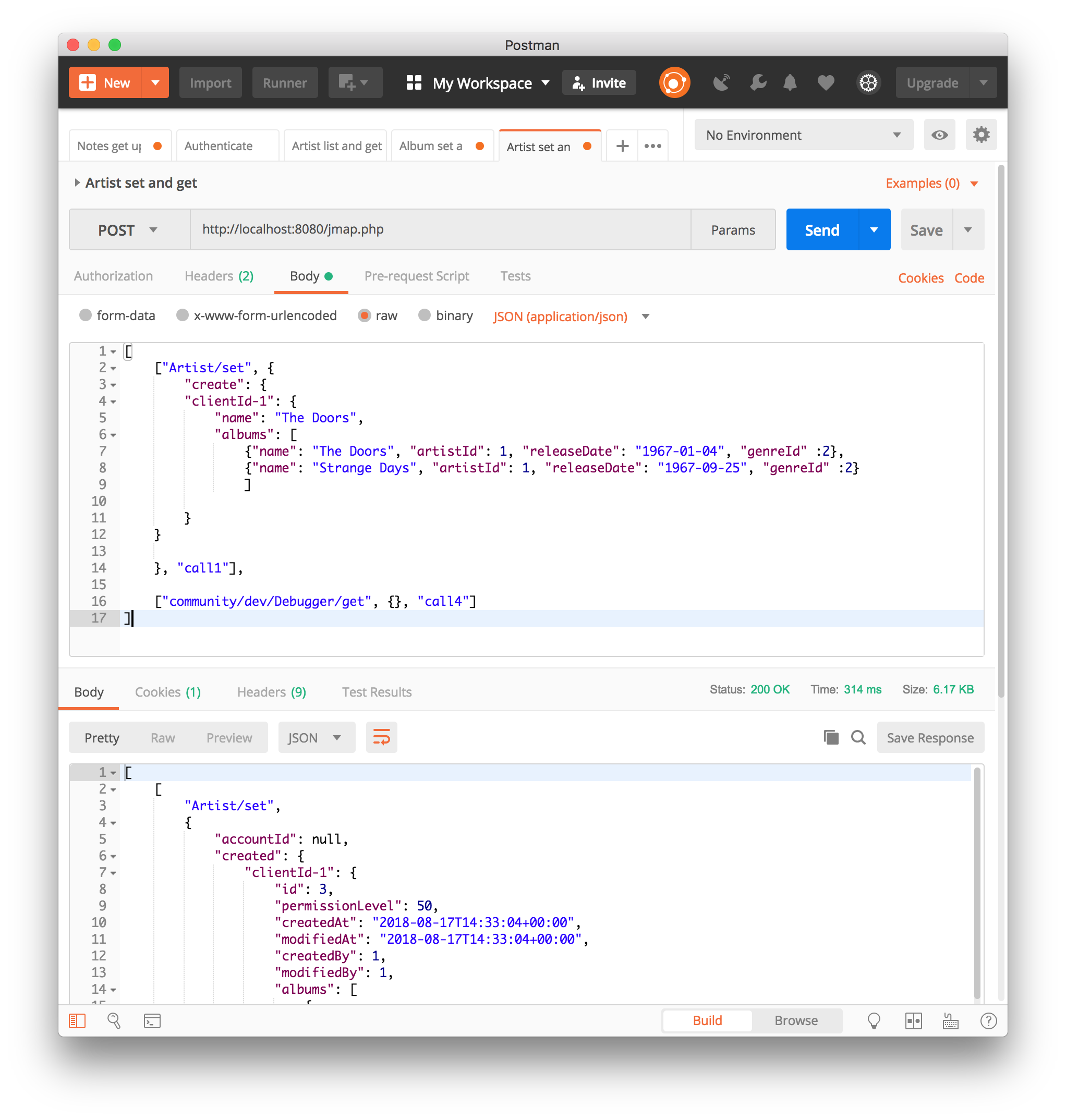
To create an artist, POST this JSON body:
[
  ["Artist/set", {
    "create": {
    "clientId-1": {
      "name": "The Doors",
      "albums": [
        {"name": "The Doors", "artistId": 1, "releaseDate": "1967-01-04", "genreId" :2},
        {"name": "Strange Days", "artistId": 1, "releaseDate": "1967-09-25", "genreId" :2}
        ]

    }
  }

  }, "call1"],

  ["community/dev/Debugger/get", {}, "call4"]
]
Query artists
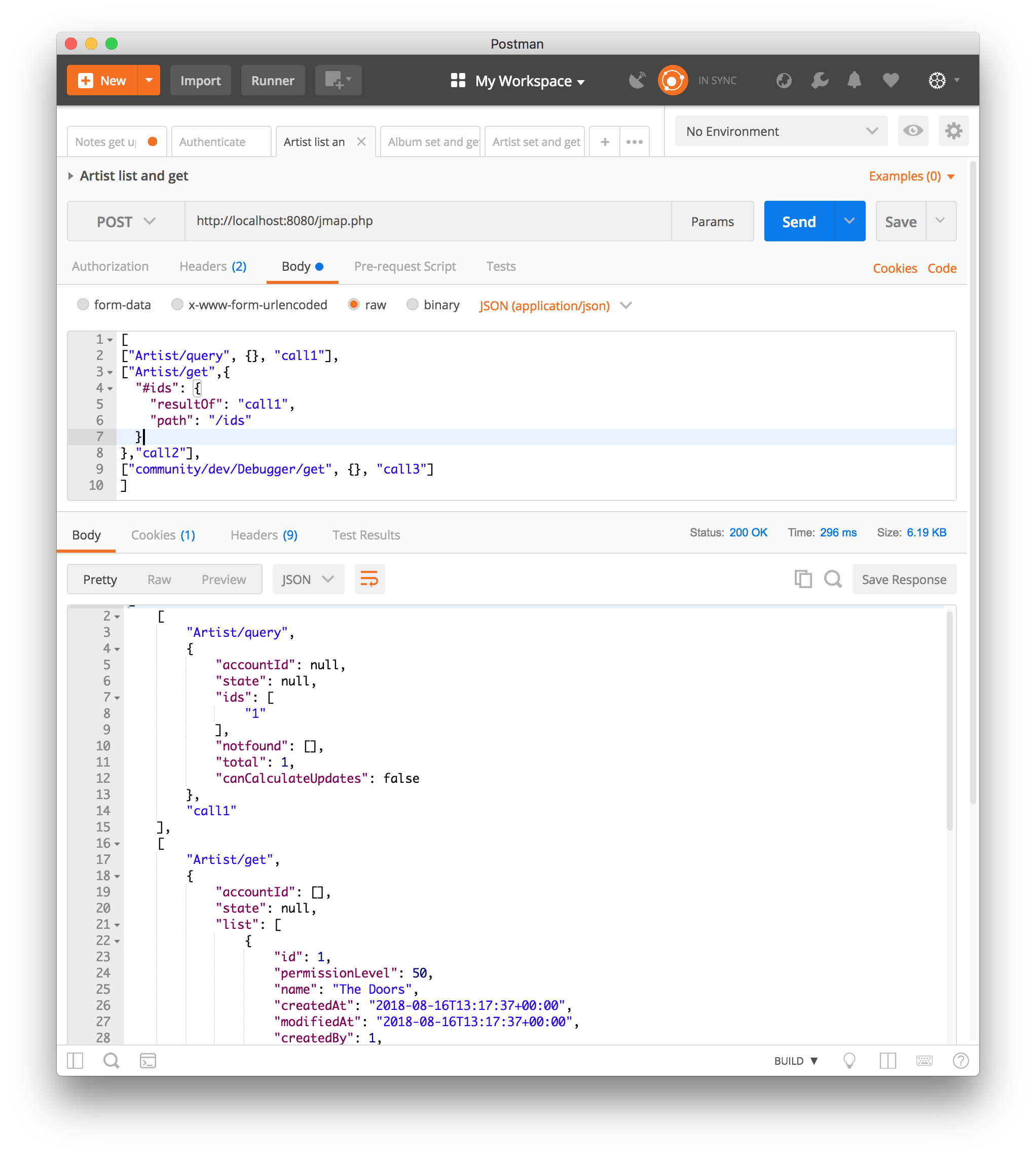
The Artist/query method is used to retrieve an ordered / filtered list of id’s for displaying a list of artists. We’ll do a direct followup call to “Artist/get” to retrieve the full artist data as well. We can Use the special “#” parameter to use a previous query result as parameter. Read more on this at the JMAP website.
POST the following to make the request:
[
["Artist/query", {}, "call1"],
["Artist/get",{
  "#ids": {
    "resultOf": "call1",
    "path": "/ids"
  }
},"call2"],
["community/dev/Debugger/get", {}, "call3"]
]
Query filters
When doing “Artist/query” requests, it’s possible to filter the results. You can pass for example:
{"filter": {"text" : "Foo"}}
We generally use the “text” filter for a quick search query. We also want to filter artists by their album genres. We can implement this in our “Artist” entity in by overriding the “filter” method:
/**
 * This function returns the columns to search when using the "text" filter.
 */
public static function textFilterColumns() {
  return ['name'];
}

      /**
       * Defines JMAP filters
       *
       * Adds the 'genres' filter which can be an array of genre id's.
       *
       * @link https://jmap.io/spec-core.html#/query
       *
       * @return Filters
       */
      protected static function defineFilters() {
              return parent::defineFilters()
                      ->add('genres', function (\go\core\db\Criteria $criteria, $value, \go\core\orm\Query $query, array $filter) {
                              if (!empty($value)) {
                                      $query->join('tutorial_music_album', 'album', 'album.artistId = artist.id')
                                      ->groupBy(['artist.id']) // group the results by id to filter out duplicates because of the join
                                      ->where(['album.genreId' => $value]);
                              }
                      });
      }
After defining this you can filter on genre by posting:
[
["Artist/query", {"filter":{"genres":[1,2,3]}}, "call1"],
    (...)
]
JMAP API protocol
These are some basic request examples. Read more on https://jmap.io about the protocol.
Module installation
When you’re done with the module, you should export your finished database into:
go/modules/tutorial/music/install/install.sql
Put all ‘DROP TABLE x’ commands in:
go/modules/tutorial/music/install/uninstall.sql
Module upgrades
When the database changes later on you can put upgrade queries and php functions in:
go/modules/tutorial/music/install/updates.php
For example:
$updates["201808161606"][] = "ALTER TABLE ...";
$updates["201808161606"][] = function() {
  //some migration code here
}
The timestamp is important. Use YYYYMMDDHHII. All the module upgrades will be mixed together and put into chronological order so dependant modules won’t break.
Custom Fields
Custom development is a fact of life, even for your simple tutorial module. In this example, we will add a few custom fields to different entities.
First, we need to update the database. For an entity to be customized, we need to add a table that follows the convention below:
<Package>_<Module>_<Entity>_custom_fields
We will have to write a database migration. Open go/modules/tutorial/music/updates.php and add the following code:
$updates['202002041445'][] = <<<'EOT'
CREATE TABLE IF NOT EXISTS `tutorial_music_artist_custom_fields`
    ( id INT(11) NOT NULL PRIMARY KEY,
    CONSTRAINT `music_artist_custom_fields_ibfk_1` FOREIGN KEY(id) REFERENCES tutorial_music_artist (id)
    ON DELETE CASCADE ON UPDATE RESTRICT ) ENGINE = INNODB;
EOT;
The next step is to add the CustomFieldsTrait trait to the Artist model.
<?php
namespace go\modules\tutorial\music\model;

use go\core\jmap\Entity;
use go\core\orm\CustomFieldsTrait;

/**
 * Artist model
 *
 * @copyright (c) 2020, Intermesh BV http://www.intermesh.nl
 * @author Merijn Schering <mschering@intermesh.nl>
 * @license http://www.gnu.org/licenses/agpl-3.0.html AGPLv3
 */
class Artist extends Entity {
    use CustomFieldsTrait;

    // Et cetera...
After rerunning the install script, the Custom fields screen in System settings should look somewhat like this:
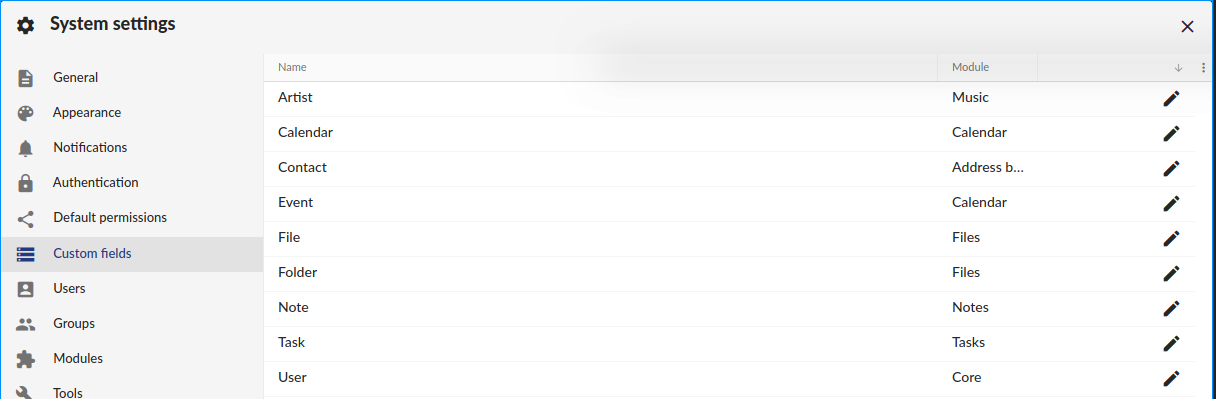
For now, we are done. In the next chapter, we will see how custom fields are made available in the web client.
ACL Entities
In certain cases, you want to either have some private entities or entities that are shared with certain groups of other users. This section deals with developing entities that have some form of access control.
In our tutorial module, we will add a ACL entity named ‘review’, which will allow you to add reviews to albums and control with whom you want to share your guilty pleasures.
The first step is to create the tutorial_music_review table. Open install/updates.php and add the code below:
$updates['202002071045'][] = <<<'EOT'
CREATE TABLE IF NOT EXISTS `tutorial_music_review`
    ( `id` INT(11) NOT NULL PRIMARY KEY,
    `albumId` INT(11) NOT NULL,
    `aclId` INT(11) NOT NULL,
    `createdBy` int(11) NOT NULL,
    `modifiedBy` int(11) NOT NULL,
    `rating` SMALLINT(5) UNSIGNED NOT NULL,
    `title` VARCHAR(190) COLLATE utf8mb4_unicode_ci NOT NULL,
    `body` TEXT collate utf8mb4_unicode_ci NOT NULL

     ) ENGINE=InnoDB DEFAULT CHARSET=utf8mb4 COLLATE=utf8mb4_unicode_ci;
EOT;
$updates['202002071045'][] = <<<'EOT'
ALTER TABLE `tutorial_music_review`
    ADD KEY `aclId` (`aclId`),
    ADD KEY `albumId` (`albumId`);
EOT;
$updates['202002071045'][] = <<<'EOT'
ALTER TABLE `tutorial_music_review`
    ADD CONSTRAINT `music_review_fk1` FOREIGN KEY (`albumId`) REFERENCES `tutorial_music_album` (`id`) ON DELETE CASCADE,
    ADD CONSTRAINT `music_review_fk2` FOREIGN KEY (`aclId`) REFERENCES `core_acl` (`id`);
EOT;
Run the database install script again and you should see the newly created table in the database.
The next step is to create a model, which we extend from the AclOwnerEntity class:
<?php

namespace go\modules\tutorial\music\model;

use Exception;
use go\core\acl\model\AclOwnerEntity;
use go\core\orm\Query;

class Review extends AclOwnerEntity
{
    /** @var int */
    public $id;
    /** @var int */
    public $aclId;
    /** @var int */
    public $createdBy;
    /** @var int */
    public $albumId;
    /** @var int */
    public $modifiedBy;
    /** @var int */
    public $rating;
    /** @var string */
    public $title;
    /** @var string */
    public $body;
    /** @var string */
    public $albumtitle;

    protected static function defineMapping()
    {
        return parent::defineMapping()
            ->addTable('tutorial_music_review')
            ->addQuery((new Query())->select('a.name AS albumtitle')
                ->join('tutorial_music_album', 'a', 'a.id=music_review.albumId'));
    }

    protected function internalSave()
    {
        if($this->isNew()) {
            $this->albumtitle = go()->getDbConnection()
                ->selectSingleValue('name')
                ->from('music_album')
                ->where(['id' => $this->albumId])
                ->single();
        }

        $this->changeArtist([$this->albumId]);

        return parent::internalSave();
    }


    protected static function internalDelete(Query $query)
    {
        //Create clone to avoid changes to the  original delete query object
        $deleteQuery = clone $query;

        //Select albums of artists affected by this delete
        $deleteQuery->selectSingleValue('albumId');

        static::changeArtist($deleteQuery->all());

        return parent::internalDelete($query);
    }

    /**
     * Our review has effect on Artist entities because they implement getAlbumCount().
     *
     * @param array $albumIds
     * @throws Exception
     */
    private static function changeArtist(array $albumIds) {
        Artist::entityType()->changes(
            go()->getDbConnection()
                ->select('art.id, null, 0')
                ->from('tutorial_music_artist', 'art')
                ->join('tutorial_music_album', 'alb', 'alb.artistId = art.id')
                ->where('alb.id', 'IN', $albumIds)
        );
    }

    protected static function defineFilters()
    {
        return parent::defineFilters()
            ->add('albumId', function (\go\core\db\Criteria $criteria, $value, \go\core\orm\Query $query, array $filter) {
                if (!empty($value)) {
                    $query->where(['tutorial_music_review.albumId' => $value]);
                }
            });

    }


}
Interestingly, we need to make sure that the Artist entity is updated upon adding or deleting a review. We force this by
overriding the internalSave and internalDelete methods.
The end
Now you’re done with the server code of the module. It is time to move on and build the web client!